Looker Studio is owned by Google and is free to use. Looker Studio (formerly Google Data Studio) is a free tool from Google to visualization software for converting data into easy-to-read reports, graphs, and dashboards.
This platform is transforming the analytics and performance marketing industry by creating report creation and sharing. With Looker Studio, agency owner track your company’s or client’s KPIs and visualize trends.
What is Looker Studio?
Looker Studio is an online tool that allows raw data to be easily visualized by transforming it into charts, graphs, tables, and other visual elements.
The best thing about Looker Studio is that it is a free tool for all users to generate meaningful insights for free.
Looker Studio vs. Looker Studio Pro
| Feature | Looker Studio (Free) | Looker Studio Pro |
| Collaboration | Basic sharing via links or no real-time team features. | Team workspaces (Manager, Content Manager, Contributor) |
| Access Control | Individual ownership | Organizational ownership |
| Automation | Scheduled report delivery | Up to 20 scheduled deliveries per report |
| AI-Powered Insights | No advanced AI features. | Gemini AI Insights for data analysis |
| Mobile App | No dedicated mobile app. | Dedicated mobile app for on-the-go access and collaboration. |
| Security | Basic security | Enhanced security with encryption |
| Customer Support | Community forums and documentation | Access to Google Cloud Customer Care |
| Pricing | Free | $9 per user per month |
Why use Looker Studio for reports?
There are many reasons to start using Looker Studio for website reporting. It allows you to easily create reports and send them to clients.




- Live data connection
- Full control over customization of reports and visuals with unlimited widget options
- Dynamic controls with report and page level filters
- Share the reports easily
Key features of Looker Studio
To get started with Looker Studio, head to the Google Looker Studio login page and log in using your Google account. The platform transforms reporting from a tedious task into a few-click action.
Interactive reports
Looker Studio shows the Reports page by default. With dynamic reporting, you can also visualize different time ranges across your charts. Here, you can create customized reports by selecting specific data fields and applying filters.
Data Sources
Looker Studio lets you create fully customizable dashboards. If you have previously connected to some data sources, they will be displayed on the page. You can also apply custom colors, fonts, and formatting to match your corporate branding.
How to Set Up Looker Studio in 30 Minutes
- Go to lookerstudio.google.com and sign in with a Google account
- Click Create and choose a template or start blank
- Click Add data and select your connector (GA4, Google Ads, Sheets, BigQuery, etc.)
- Authorize the connector and choose your dataset
- Drag-and-drop chart components from the toolbar
- Share via link or schedule email delivery as PDF
How to Create a Report in the Looker Studio
There are multiple methods of creating reports in the Looker Studio. First-time user should follow the two-step process below.
- Link the template to a data source
- Select a template
Select a Template
The first step is to select a template. Now you will have access to the data already present in the template you selected. That said, to create a template, select Blank Reports, as shown below.
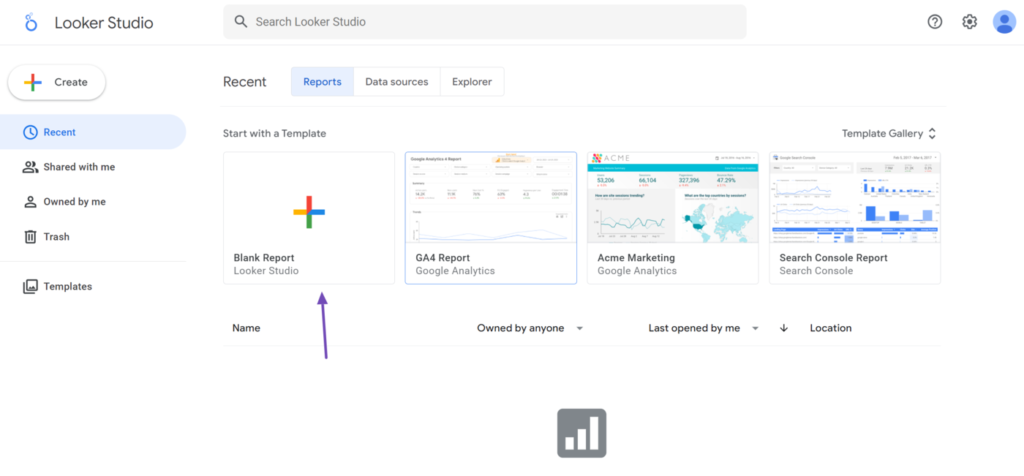
You will observe that the templates in the gallery have been separated into categories depending on the application. In this case, navigate to the section of the application you want to connect to and select from the available templates.
Link the Template to a Data Source
The next step is to link your template to a data source. Now you can insert pre-existing data into the templet. Connectors are tools that allow Looker Studio to connect to other apps and databases.
Once done, you can proceed to modify your data to suit your requirements. This makes creating reports very easy, and the resulting report is also completely professional.
Conclusion
Looker Studio is a powerful, feature-rich tool that is highly useful for creating reports. With this tool, marketers can automate the process of generating reports from all their data.
If you are looking for a powerful yet free data analysis tool, LookerStudio could be a great option. This tool takes data and transforms it into valuable insights and custom reports.
FAQs
Is Looker Studio free?
Yes, Looker Studio is completely free with all features and no user limits. For most businesses, the free Looker Studio is the right tool.
What is Looker used for?
Looker Studio is a free tool that is used to generate intuitive reports.
How many data sources does Looker Studio support?
Looker Studio has 20+ native Google connectors (GA4, Google Ads, Sheets, BigQuery, Search Console, etc.)